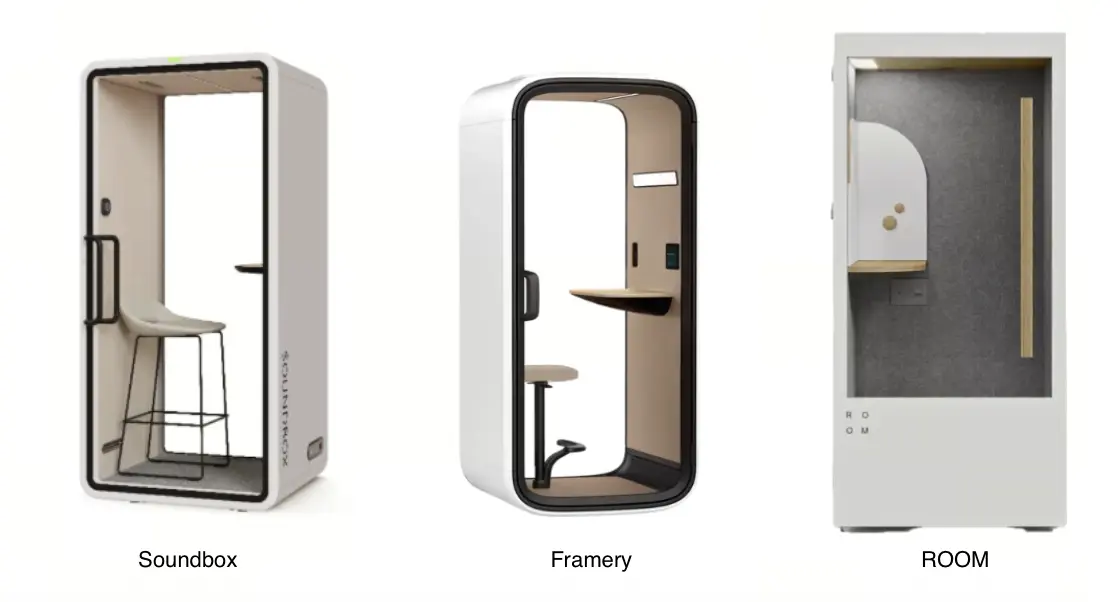
Brand names alone are not enough to choose an office pod. This guide focuses on three models for individual phone and video calls: the Soundbox VRT S, Framery One Compact, and ROOM Phone Booth. Compare their specifications and supporting documents against the same project requirements, and confirm the configurations available in your location.
Use one project brief
Give each supplier the same project location, quantity, floor plan, intended use, typical session length, privacy requirements, and installation schedule.
Record the exact model and configuration quoted, including furniture, electrical options, and optional features or services. Confirm local availability and ask suppliers to distinguish standard features from optional extras.
Compare documented fields
Start with occupancy, dimensions, furniture, and user controls. Distinguish the pod’s external dimensions from its usable interior space, and confirm which furnishings and features are included in the quoted configuration.
| Field | Soundbox VRT S | Framery One Compact | ROOM Phone Booth |
|---|---|---|---|
| Intended occupancy | 1 person | 1 person | 1 person |
| Price listed on the official website | $10,200 | $ 9,690 | $ 6,495 |
| External dimensions — W × D × H | 1000 × 940 × 2100 mm | 1030 × 1000 × 2250 mm | Approx. 1041 × 1092 × 2261 mm |
| Internal dimensions — W × D × H | 890 × 825 × 1960 mm | 860 x 920 x 2040 mm | Not specified on the product page |
| Exterior color options | Standard and 4 custom color options | 8 exterior colors options | Light and dark finish options |
| Desk | Desk included | Fixed-height table, 1020 mm above the floor | Built-in desk and magnetic board |
| Seating | Seat included | - Base: no stool.- Essentials: height-adjustable stool with footrest | Seating inclusion not specified |
| Lighting and adjustment | Adjustable lighting; 300-700 lux; color temperature: 2800-6500K | Dual 4000K light sources; standard and video-call modes with manual adjustment. | Sensor-activated LED lighting; manual adjustment not specified. |
| Occupancy sensing and activation | mmWave presence sensor activates lighting and airflow | mmWave radar presence sensing activates lighting and ventilation | Motion sensor activates fans and lighting |
| Ventilation controls | User-adjustable airflow; automatic adjustment based on presence and temperature | Manually adjustable airflow; adaptive ventilation | Sensor-activated fans; manual adjustment not stated |
| Published acoustic rating | Dₛ,ₐ: 30.4 dB, ISO 23351-1 | Dₛ,ₐ: 30 dB, ISO 23351-1 | NIC 32; not directly comparable with Dₛ,ₐ |
| Published ventilation data | Approximately 46 air changes per hour (ACH) | Maximum 36 L/s (129.6 m³/h) | Not specified on the product page |
| Power outlets and charging | AC outlet, USB-C PD 20 W, and USB-A QC 3.0; confirm regional outlet configuration | AC outlet and 65 W USB-C PD charging port; regional configuration to be confirmed | Two power outlets |
| Relocation | Casters included | Optional casters for relocation without disassembly | Designed for disassembly and relocation |
Information is based on the linked manufacturer sources. Specifications, prices, and included features may vary by market and configuration. Confirm current details with each supplier.
How to evaluate the differences
1. Compare acoustic evidence
Start with how acoustic performance was measured. ISO 23351-1 provides a laboratory method for measuring speech level reduction in furniture ensembles and enclosures, including office pods. Review each model’s published rating alongside its test method and configuration. The table includes both Dₛ,ₐ and NIC ratings, which should not be ranked directly against each other. Even when two models share a performance class, compare their individual results and test conditions. For confidential conversations, assess the intended location and privacy requirements with your project team.
- Before ordering an acoustic pod, ask each supplier for a test report covering the exact model and configuration you are considering. Compare results across all three models where the test methods and conditions are comparable.
- As shown in the table above, Soundbox VRT S and Framery One Compact are both listed as Class A. This places them in the same published performance class, but does not establish identical acoustic performance.
2. Read ventilation figures in context
Alongside sound isolation, consider ventilation and the noise generated by the ventilation system. Check the units before comparing airflow figures: air changes per hour (ACH) express airflow relative to the pod’s internal volume, while liters per second (L/s) express a volume flow rate. These figures cannot be compared by numerical size alone. Ask suppliers to confirm the applicable model, operating settings, and measurement conditions for both airflow and noise, and whether users can adjust ventilation during a call.
- Soundbox: The VRT S describes centrifugal fan technology developed in collaboration with Panasonic, designed to deliver high airflow at low speed. It lists approximately 46 air changes per hour and operating noise below 40 dB. Confirm the figures and test conditions applicable to VRT S.
- Framery: The One Compact lists maximum airflow of 129.6 m³/h, default airflow of approximately 94 m³/h during use, and standby airflow of approximately 58 m³/h. Ventilation runs at a higher speed after use. These separate figures help distinguish maximum capacity from normal operating settings.
- ROOM: The Phone Booth states that air is replaced every minute through an inlet and two ceiling fans. The page does not specify a corresponding flow rate in L/s or m³/h, or the measurement conditions behind this claim. Request those details before comparing it with the other models.
3. Check the configuration and installation requirements
Compare the configuration you would actually order. Confirm whether seating, casters, and digital services are included or optional. Distinguish in-pod lighting and ventilation controls from booking and management tools, and check any network or subscription requirements. Ask who handles assembly and relocation, what access and clearance are needed, and which model-specific electrical, fire safety, and emissions documents are available for your project location.
- As shown in the table above, Soundbox VRT S and Framery One Compact both offer casters to assist with relocation. For projects where office layouts may change, check whether casters are included or optional and what floor conditions and moving procedures the manufacturer requires. Distinguish repositioning a pod within a room from moving it between floors or buildings, which may require disassembly or professional assistance.
4. Check warranty coverage
Compare warranty coverage alongside the length of the warranty. Check which components are covered, when coverage begins, and whether installation or registration requirements apply. Ask about repair labor, transport costs, replacement parts, and maintenance obligations. Confirm the terms applicable to the model and location before ordering.
- Soundbox: The VRT S product page states a one-year manufacturer’s warranty covering structural integrity and core components, excluding glass. Request the full terms for the quoted configuration.
- Framery: Its warranty terms effective March 1, 2024 provide five years of product coverage, with two years for wear parts and electronic components and one year for Framery Connect Sensors, starting from delivery. Installation and warranty activation requirements apply; confirm whether this version governs your purchase.
- ROOM: Its warranty policy effective June 17, 2025 provides a five-year limited warranty on main parts against defects in materials and workmanship, starting from shipment. Coverage is subject to exclusions and conditions, including requirements for use and service access.
5. Compare the full purchase cost
The website prices in the table are a starting point and may reflect different configurations. Request itemized quotes for the same location, quantity, and required equipment. Check whether furniture, taxes, delivery, installation, and optional services are included.
Separate one-time purchase and installation costs from recurring software fees and maintenance costs. Compare the totals only after confirming that each quote covers your requirements, and record the quote date, validity period, and exclusions.
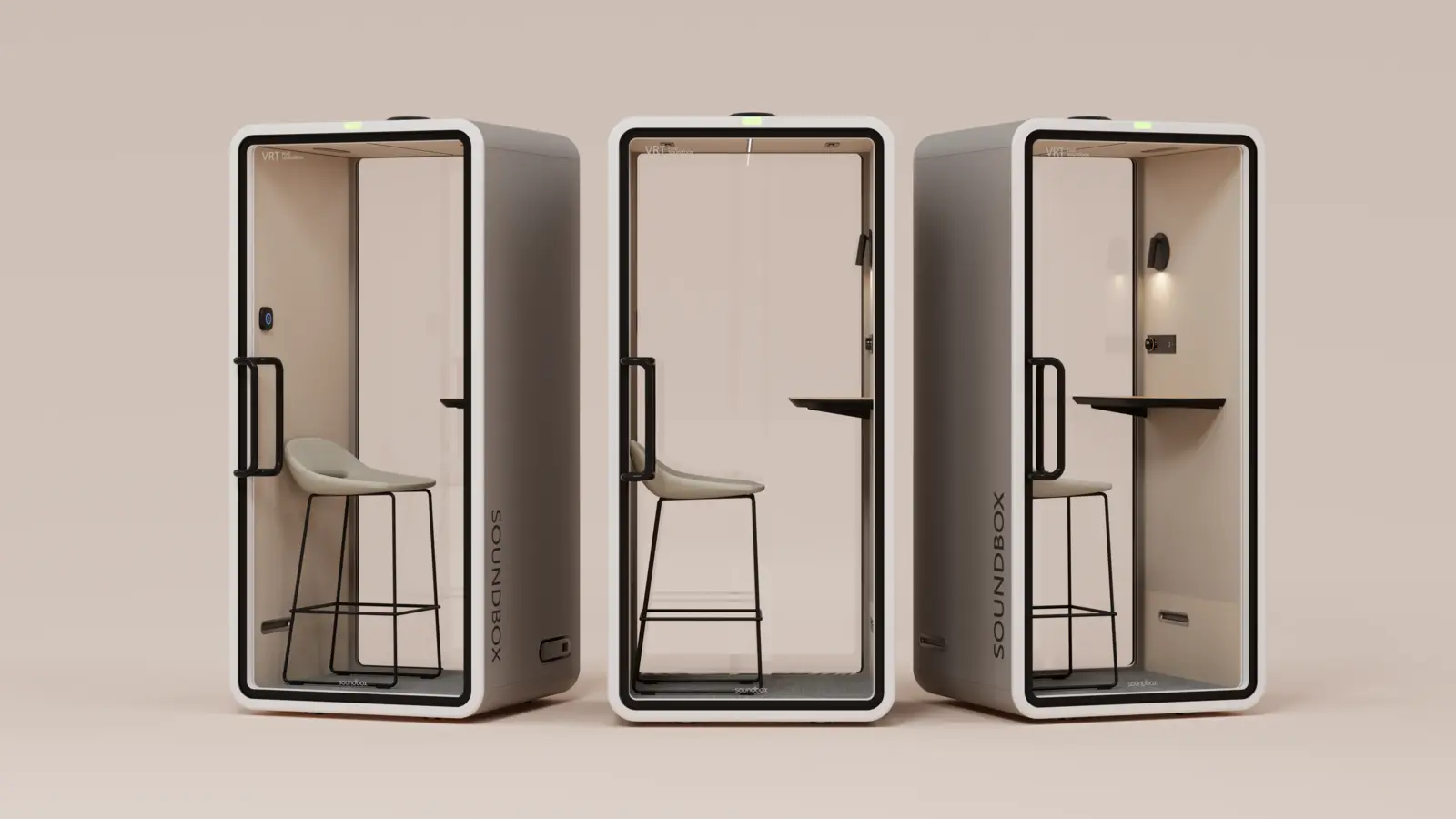
For projects that need a furnished single-person pod with adjustable lighting and integrated controls, Soundbox VRT S brings these features together in one configuration:
- A coordinated interior: VRT S comes complete with interior wall finishes, integrated lighting, a desk, and a seat. The pod and its furnishings form one package, simplifying the process of specifying a space for seated calls.
- Specified materials and construction: The VRT S specifications list 40 mm carbon-plastic composite panels, 6.8 mm laminated acoustic glass, and an aluminum frame, giving buyers concrete construction details to review alongside acoustic test data.
- Personal control over the environment: Adjustable lighting brightness and color temperature let users tailor the lighting to their preferences. The Smart Matrix panel brings lighting and airflow controls together within reach.
- Features for shared use: The product page also describes mobile booking and backend status reporting. For projects with multiple pods, these functions are worth considering alongside the physical configuration; confirm the included services and any ongoing fees.
To explore how VRT S fits your workspace, share your floor plan, project location, and quantity with our team. We can help you review the configuration, provide relevant product documentation, and prepare an itemized quote.